

How to use Heart Rate Sensor Module

Lightly place your index finger on the sensor to measure your heart rate (beats per minute).
You can use it for projects such as blinking an LED in time with your heartbeat.
About the Module
The sensor uses the MAX30102. It lights your fingertip with red and infrared LEDs and reads the reflected light with a photodetector to detect changes in blood flow (heartbeats).
It connects to SPACEBLOCK via I2C communication. Its I2C address is 0x57. Because the touchpad module uses the same address, the heart rate sensor and the touchpad cannot be connected to the same Wire at the same time.
Specifications
| Voltage | 5V |
|---|---|
| Current Consumption | 60mA |
| Communication | I2C |
| Size | 20 x 36 (mm) |
How to Connect
Connect the heart rate sensor module and SpaceBlock microcontroller board using jumper wires (male-female) as follows:
- Heart rate sensor VIN pin to SpaceBlock 5V
- Heart rate sensor GND pin to SpaceBlock GND
- Heart rate sensor SCL pin to SpaceBlock B1 pin
- Heart rate sensor SDA pin to SpaceBlock B3 pin
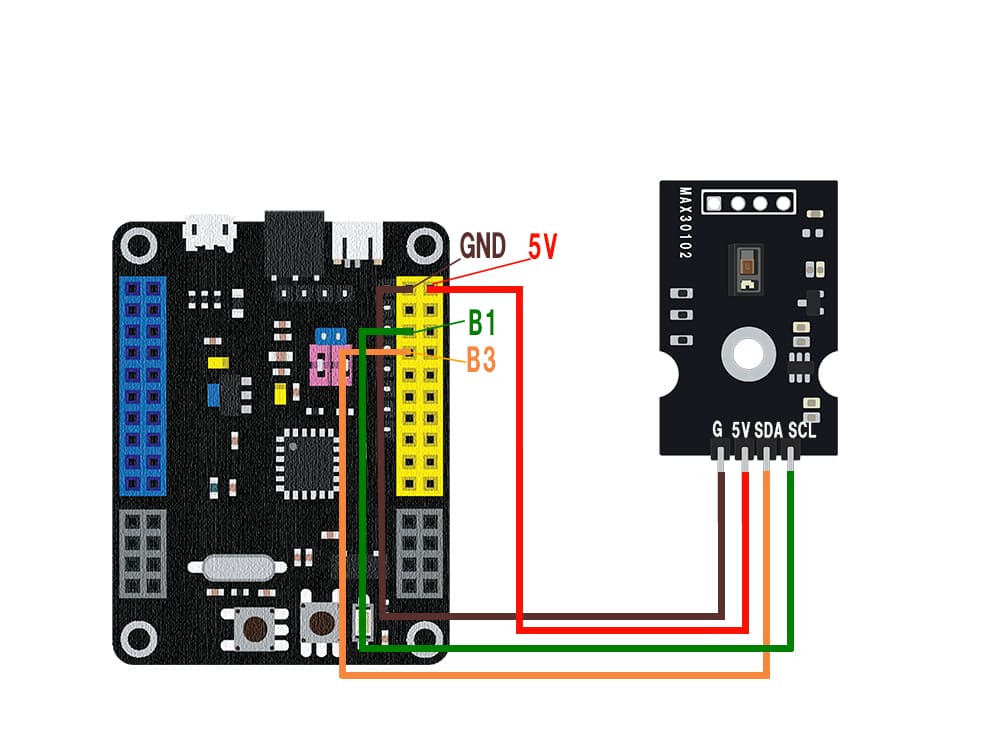
※B1 (SCL) and B3 (SDA) are Wire1. To use Wire2, connect SCL to B0 and SDA to B2, and select Wire2 in the block.
※5V and GND can also be inserted into pins with the same markings on the SpaceBlock microcontroller board.
How to Use
The "heart rate sensor [Wire1] BPM" block returns your heart rate (BPM). Lightly place your finger on the sensor and keep it still for about 15 seconds until the value becomes stable. It returns 0 when no finger is detected or before the value is stable.
The "heart rate sensor [Wire1] detected a beat" block becomes true once for each heartbeat it detects. You can use it to blink an LED in time with your heartbeat.
You can get values from the heart rate sensor module using blocks in the "Input" category of your project.
For detailed block usage, click here
I2C Read