

How to use Infrared Receiver Sensor Module

Can receive pressed buttons from remote control using infrared rays.
You can also control SPACEBLOCK® using the remote control.
About the Module
The infrared receiver sensor receives infrared signals (38kHz, NEC protocol) sent from a remote control and outputs them as a digital signal on a single signal line.
Each button on the remote control sends a different code, so you can tell which button was pressed. The included remote control supports CR2025 batteries.
Specifications
| Voltage | 5V |
|---|---|
| Frequency Modulation | 38kHz |
| Output | Digital |
How to Connect
Connect the infrared receiver sensor module and SpaceBlock microcontroller board using jumper wires (male-female) as follows:
- Infrared receiver sensor S pin to any SpaceBlock digital pin (e.g. A3)
- Infrared receiver sensor G pin to SpaceBlock GND
- Infrared receiver sensor V pin to SpaceBlock 5V
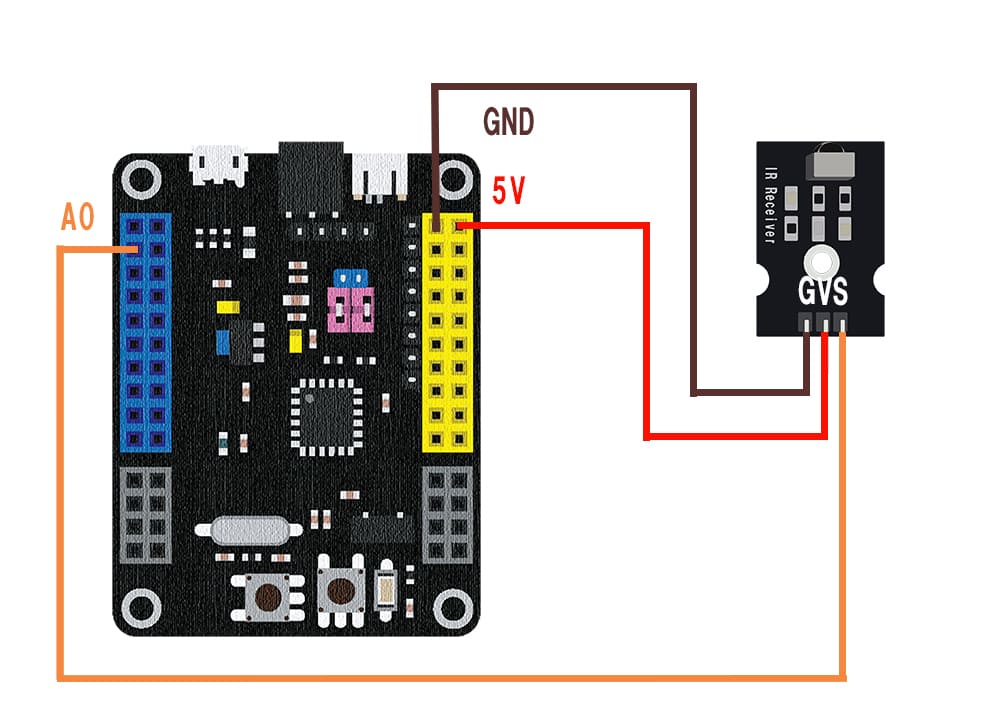
※Select the pin connected to the S pin in the pin field of the block.
※5V and GND can also be inserted into pins with the same markings on the SpaceBlock microcontroller board.
How to Use
The "IR receiver [A3] received" block becomes true when a new remote control signal is received. While you keep a button pressed, it becomes true repeatedly.
The "IR receiver [A3] code" block returns the received code as an 8-digit hexadecimal string (e.g. 00FF30CF). Each button on the included remote control returns a different code, so use it like "if code = "00FF30CF"".
You can get values from the infrared receiver sensor module using blocks in the "Input" category of your project.
For detailed block usage, click here
Digital Read