

How to Use Load Cell (Weight Sensor)
You can measure the weight of objects placed on the load cell in grams (g).
You can use it for projects such as scales or detecting when something is placed.
About the Module
A load cell is a metal part that bends very slightly when weight is applied. Because the electrical change caused by the bending is very small, it is amplified by an amplifier called HX711 before being read.
Load cells of any capacity (any number of kg) can be used in the same way by calibrating with an object of known weight (e.g. a 100g weight) using the calibration block.
Specifications
| Voltage | 5V (2.6~5.5V) |
|---|---|
| Communication | 2-wire (DT, SCK) |
| Resolution | 24bit |
How to Connect
Connect the HX711 amplifier and SpaceBlock microcontroller board using jumper wires (male-female) as follows:
- HX711 DT pin to any SpaceBlock pin (e.g. B9)
- HX711 SCK pin to any SpaceBlock pin (e.g. B8)
- HX711 VCC pin to SpaceBlock 5V
- HX711 GND pin to SpaceBlock GND
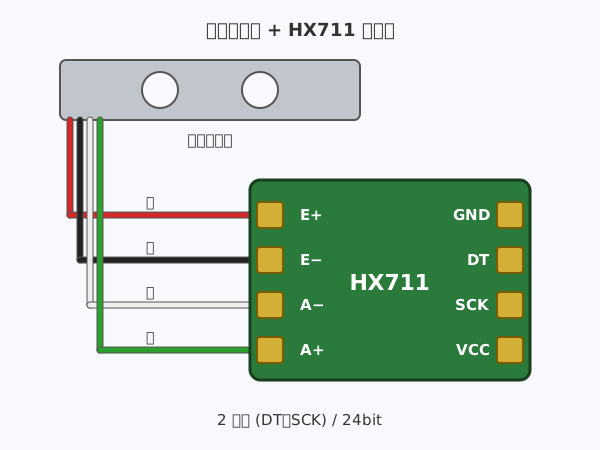
Connect the four wires of the load cell to the HX711 terminals with the same markings.
- Red wire to HX711 E+
- Black wire to HX711 E−
- White wire to HX711 A−
- Green wire to HX711 A+
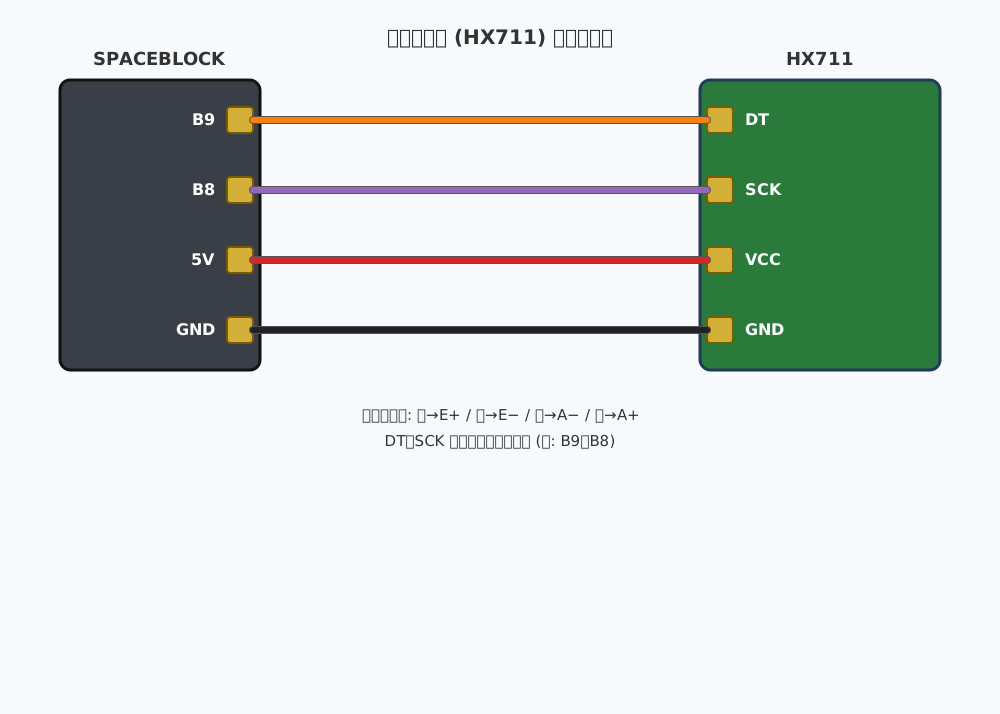
※Select the pins connected to the DT and SCK pins in the DT and SCK fields of the block.
※5V and GND can also be inserted into pins with the same markings on the SpaceBlock microcontroller board.
How to Use
The "Get weight (g) from load cell DT [B9] SCK [B8]" block returns the weight of the object placed on it (g).
The "Tare load cell DT [B9] SCK [B8] (set to zero)" block sets the current weight to 0 (tare). If you use it with a container placed on the load cell, you can measure only the weight of the contents.
The "Calibrate load cell DT [B9] SCK [B8] with [100] g" block calibrates the load cell so that the weight of an object of known weight placed on it is shown correctly.
When using it for the first time, prepare in the following order.
1. Run the "Tare" block with nothing on the load cell
2. Place a weight of known mass (e.g. 100g) and run the "Calibrate" block
3. After that, the "Get weight (g)" block reads the weight in grams
You can get values from the load cell using blocks in the "Input" category of your project.
For detailed block usage, click here
Get weight (g) from load cell